Noxway





 A lightweight, self-contained API gateway written in Go.
All configuration is managed through a built-in web admin panel — no config files, no external dashboards.
A lightweight, self-contained API gateway written in Go.
All configuration is managed through a built-in web admin panel — no config files, no external dashboards.
Features
Routing
- Path-based reverse proxy with per-service sub-endpoints
- Header-based routing (route by request header value)
- WebSocket proxying (enable per endpoint)
- Custom timeout per endpoint
- Service IP whitelist
Security
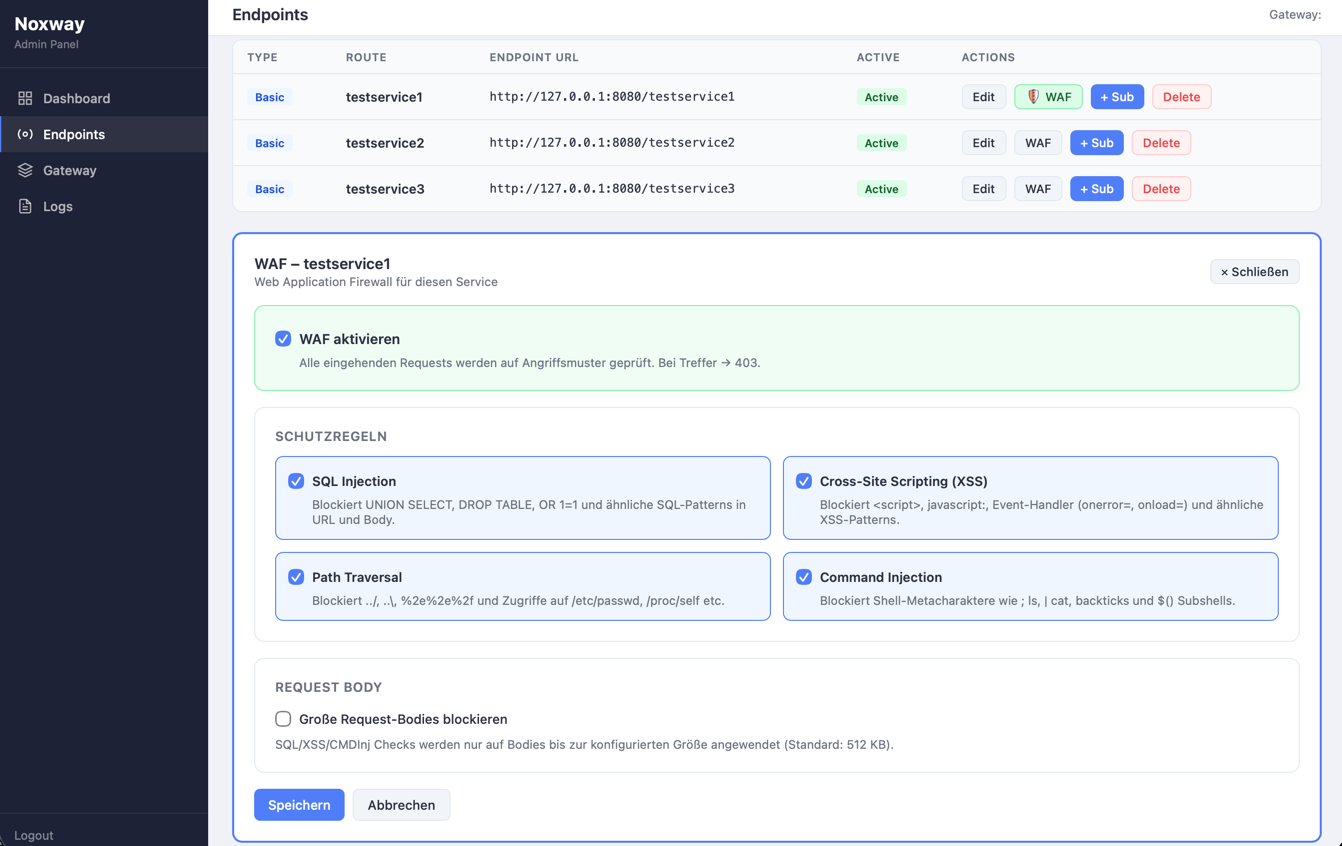
- Web Application Firewall (WAF) per service: SQLi, XSS, Path Traversal, Command Injection, body size limiting
- JWT pre-check on endpoints (validate inbound JWTs before forwarding)
- IP ban list (exact IP or CIDR range)
- System whitelist for admin access (IP or DNS hostname)
- Rate limiting with per-IP sliding window
- TLS support with Let's Encrypt integration
Admin panel
- Built-in HTMX-based UI at
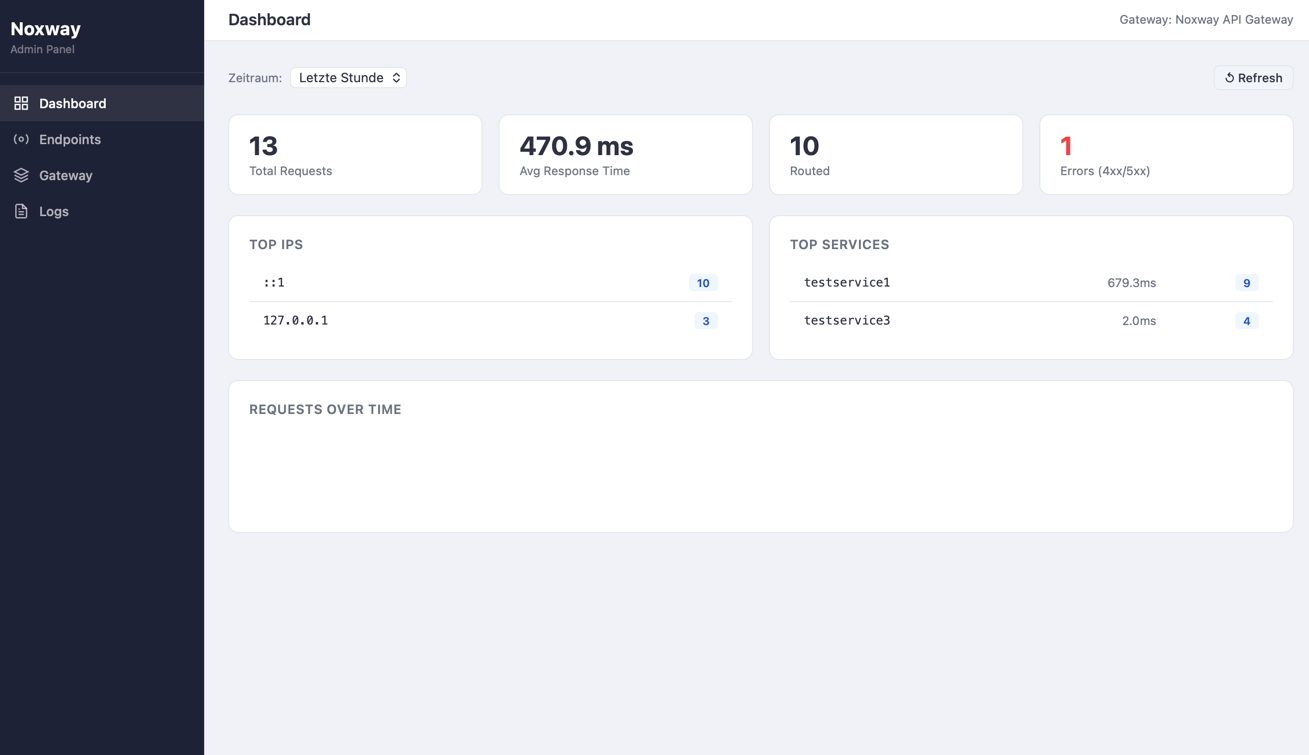
/admin - Live dashboard with request stats and charts
- Full service/endpoint CRUD
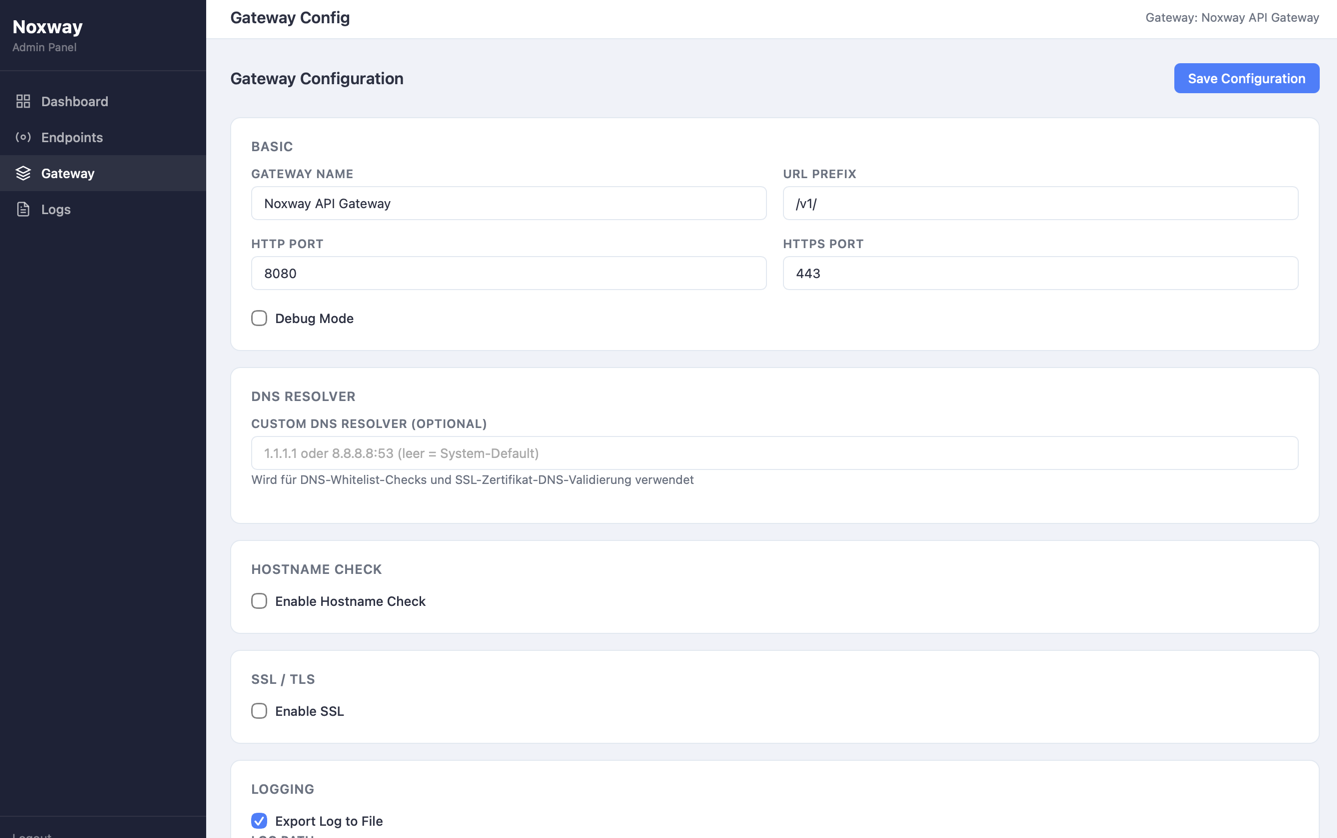
- Gateway configuration editor
- WAF configuration per service
- Access log viewer
- Embedded in the binary — no separate frontend process
Infrastructure
- Single binary, no runtime dependencies
- PostgreSQL for all config and logs — no JSON files at runtime
- Docker-ready
Screenshots
Quick start
1. Create your .env file
cp .env.example .env
Edit .env and set strong values for both secrets:
POSTGRES_PASSWORD=your_secure_db_password
JWTSECRET=your_very_long_random_secret
Generate a secure JWT secret:
openssl rand -hex 32
2. Start
docker compose up -d
The gateway and PostgreSQL start automatically. On first boot, default configuration is written to the database.
3. Set the admin password
Default credentials are admin / admin. Change the password and configure the admin IP whitelist immediately:
curl -X POST http://localhost:8080/setAdmin \
  -H "Content-Type: application/json" \
  -d '{
    "password": "admin",
    "newpassword": "your_new_password",
    "whitelist": ["YOUR_IP_ADDRESS"],
    "dnswhitelist": []
  }'
whitelist restricts which IPs can access the admin panel and management API. Use [] to allow all IPs (not recommended for production).
4. Open the admin panel
http://localhost:8080/admin
Environment variables
| Variable | Required | Description |
|---|---|---|
DATABASE |
yes | PostgreSQL DSN — set automatically by docker-compose |
JWTSECRET |
yes | Secret for signing admin session JWTs (min. 32 chars recommended) |
POSTGRES_PASSWORD |
yes | Password for the noxway DB user (docker-compose only) |
docker-compose.yml
services:

  noxway:
    build: .
    ports:
      - "8080:8080"
      - "443:443"
    volumes:
      - ./certs:/app/certs
      - ./log:/app/log
    env_file:
      - .env
    environment:
      DATABASE: "postgres://noxway:${POSTGRES_PASSWORD}@db:5432/noxway?sslmode=disable"
    restart: unless-stopped
    depends_on:
      db:
        condition: service_healthy

  db:
    image: postgres:16-alpine
    environment:
      POSTGRES_DB:       noxway
      POSTGRES_USER:     noxway
      POSTGRES_PASSWORD: "${POSTGRES_PASSWORD}"
    volumes:
      - db_data:/var/lib/postgresql/data
    restart: unless-stopped
    healthcheck:
      test: ["CMD-SHELL", "pg_isready -U noxway -d noxway"]
      interval: 5s
      timeout: 5s
      retries: 10

volumes:
  db_data:
Configuration
All configuration is persisted in PostgreSQL and managed through the admin panel. No JSON files are used at runtime.
Gateway settings (/admin/gateway)
| Setting | Description |
|---|---|
| Port | HTTP listen port (default: 8080) |
| SSL Port | HTTPS listen port (default: 443) |
| Prefix | URL prefix for proxied routes (default: /v1/) |
| CORS | Enable CORS with configurable origins, methods, headers |
| Rate Limiting | Requests per window per IP, with whitelist |
| Ban List | Block IPs or CIDR ranges (e.g. 10.0.0.0/8) |
| Let's Encrypt | Automatic TLS certificate retrieval |
| DNS Resolver | Custom DNS server for whitelist DNS lookups |
Services & Endpoints (/admin/endpoints)
Each service maps to a URL path prefix and has one base endpoint plus optional sub-endpoints.
Sub-endpoints are matched by request header value — e.g. route X-System: dev to a staging backend while all other traffic goes to the base endpoint.
| Endpoint setting | Description |
|---|---|
| Endpoint URL | Backend to forward to |
| Active | Enable/disable without deleting |
| Verify SSL | Validate backend TLS certificate |
| WebSocket Proxy | Bridge WebSocket connections to backend |
| Override Timeout | Per-endpoint timeout in seconds |
| Header Add | Inject headers into the forwarded request |
| Header Replace | Replace header values before forwarding |
| Header Exists | Reject requests missing specific headers |
| IP Whitelist | Allow only listed IPs for this endpoint |
| JWT Pre-Check | Validate inbound JWT before forwarding |
| Client Cert Auth | Mutual TLS with a client certificate |
WAF (/admin/endpoints → WAF button)
Configured per service. When enabled, every request is inspected before forwarding.
| Rule | What it blocks |
|---|---|
| SQL Injection | UNION SELECT, DROP TABLE, OR 1=1 and similar patterns |
| XSS | <script>, javascript:, inline event handlers |
| Path Traversal | ../, encoded variants, /etc/passwd, /proc/self |
| Command Injection | Shell metacharacters, backticks, $() subshells |
| Large Body | Requests exceeding the configured body size (KB) |
Routing
Requests are matched by URL path prefix:
https://your-gateway.com/v1/{service}/{rest...}
A service named api with endpoint http://backend:3000 proxies:
GET /v1/api/users/123 → GET http://backend:3000/users/123
WebSocket connections use the same URL — enable the WebSocket Proxy flag on the endpoint and the gateway bridges the connection transparently (http:// → ws://, https:// → wss://).
Docker volumes
| Path | Description |
|---|---|
/app/certs |
TLS certificates (cert.pem, privkey.pem or Let's Encrypt output) |
/app/log |
Access logs when file export is enabled in gateway settings |
Development
Requires Go 1.23+ and a running PostgreSQL instance.
# Start a local database
docker run -d \
  --name noxway-dev-db \
  -e POSTGRES_DB=noxway \
  -e POSTGRES_USER=noxway \
  -e POSTGRES_PASSWORD=devpassword \
  -p 5432:5432 \
  postgres:16-alpine

# Run the gateway
export DATABASE="postgres://noxway:devpassword@localhost:5432/noxway?sslmode=disable"
export JWTSECRET="dev-secret-at-least-32-chars-long"
go run .
Production checklist
-
JWTSECRETis a random string of at least 32 characters (openssl rand -hex 32) -
POSTGRES_PASSWORDis strong and unique - Admin IP whitelist is set to your actual management IPs
- Default admin password has been changed via
/setAdmin - SSL is enabled with a valid certificate
- Port
5432is not exposed outside the Docker network
Screenshots


License
See LICENSE.