 1B43C739-617D-4655-A9AC-9A16200984BF_1_102_o.jpeg
Add comprehensive tests for environment variable quoting, session management, and vault operations
1B43C739-617D-4655-A9AC-9A16200984BF_1_102_o.jpeg
Add comprehensive tests for environment variable quoting, session management, and vault operations

ev


Local encrypted secret manager for modern AI-native development.
ev moves secrets out of your repo, encrypts them locally, and gives them back only when your app actually runs.
- No
.envfiles sitting next to code - No daemon, no cloud, no background service
- Great DX for
uv,go,npm,terraform, IDE run configs, and AI coding agents - Optional
1Passwordsync for encrypted off-site backup - Optional GitWall cloud sync — self-hosted, end-to-end encrypted backup and multi-device sync
Why ev exists
AI coding agents can read your whole working tree. If secrets live in .env, secrets.tfvars, or config.local.json, they are part of that surface area.
ev keeps secrets outside the project and stores only a small .envault marker file in the repo.
before                          after
----------------------------    --------------------------------
my-project/                     my-project/
  .env          <- visible        .envault      <- project name only
  app.py                         app.py
  ...                            ...

                                 ~/.envault/
                                   vault.json  <- encrypted vault
Installation
Homebrew (recommended)
brew install adrian-lorenz/ev/ev
Install script (macOS / Linux)
curl -fsSL https://git-wall.de/noa-x/ev/raw/main/install.sh | bash
The install script downloads the latest published release.
Windows (PowerShell)
iwr -useb https://git-wall.de/noa-x/ev/raw/main/install.ps1 | iex
Installs to %LOCALAPPDATA%\ev\ and adds it to your PATH automatically. No admin required.
Go install
go install github.com/adrian-lorenz/ev@latest
Build from source
git clone https://git-wall.de/noa-x/ev
cd ev
make build
Uninstall
Homebrew
brew uninstall ev
Uninstall on macOS / Linux (install script)
sudo rm /usr/local/bin/ev
rm -rf ~/.envault
Uninstall on Windows
Remove-Item "$env:LOCALAPPDATA\ev" -Recurse -Force
# remove PATH entry if added manually
Migrating from install script to Homebrew? Remove the old binary first to avoid having two versions:
sudo rm /usr/local/bin/ev
brew install adrian-lorenz/ev/ev
Your vault at
~/.envault/is untouched and will be picked up automatically.
Quick Start
# install
brew install adrian-lorenz/ev/ev

# inside your project
cd my-project
ev init
ev import .env

# recommended workflow
ev open
ev run uv run python main.py

# or manage visually
ev manage
Why it feels good to use
ev run is the star
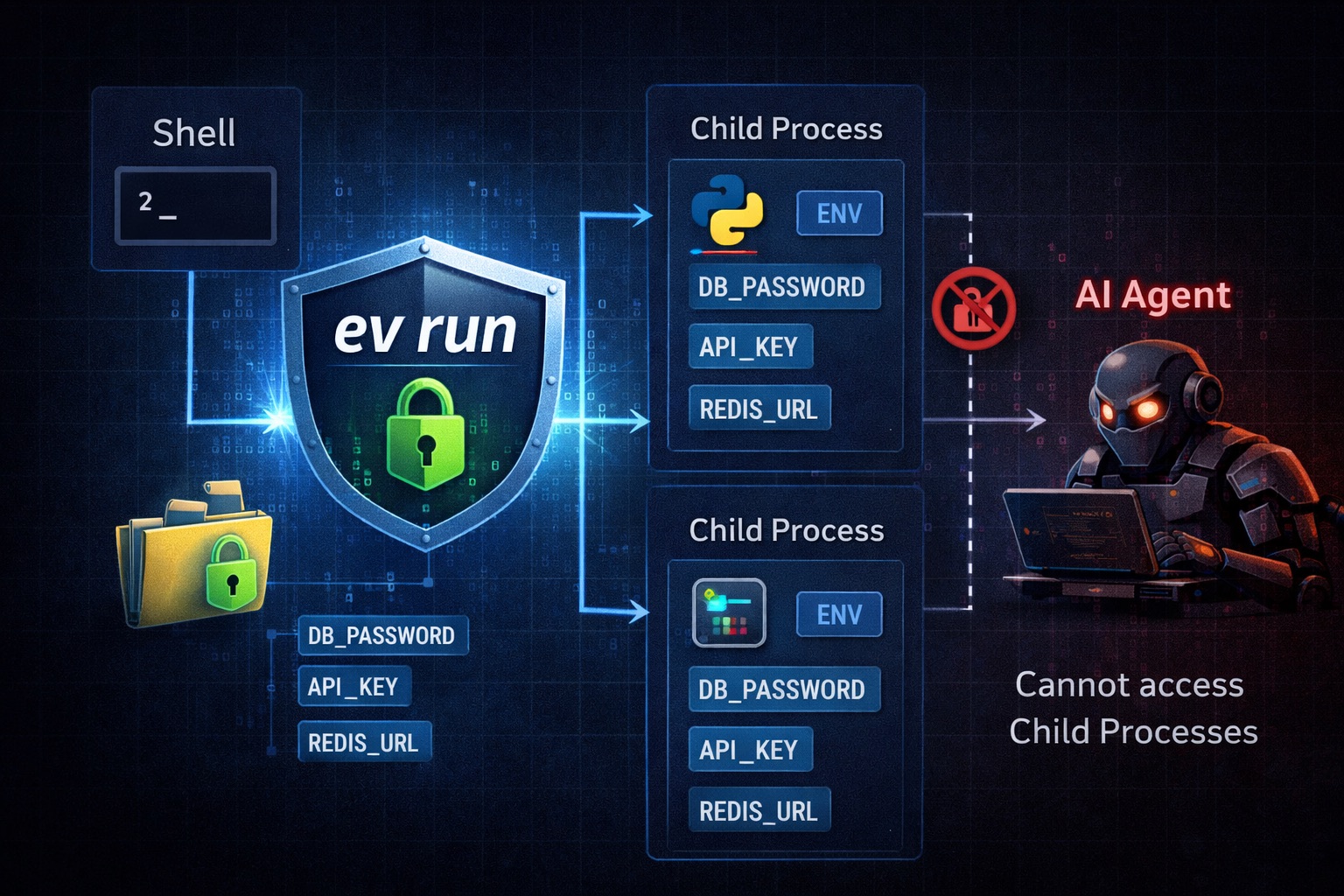
Instead of exporting secrets into your shell and hoping every subprocess inherits the right state, ev run injects them directly into the child process.
ev run uv run python main.py
ev run uvicorn main:app --reload
ev run go run .
ev run npm run dev
ev run terraform plan
That means:
- less shell pollution
- no copy-pasting secrets around
- great fit for IDE run configs
- especially nice with
uv, where you often want one clean command that just works
When a session is open, ev run becomes the "set it and forget it" path for local development.
1Password Sync is a strong companion
ev is intentionally local-first. But sometimes you still want an encrypted copy outside your machine, or a simple way to hand project secrets to teammates.
ev sync 1password --op-vault engineering
ev sync 1password --op-vault engineering --project my-api
ev pushes each project as a Secure Note in .env format:
engineering
  ev: my-api
  ev: payment-service
  ev: infra
This is especially useful for:
- off-site backup
- team handoff
- keeping "what this project needs" in one shareable place
Sync is one-way: ev -> 1Password.
Features
- AES-256-GCM encryption with Argon2id key derivation
- Secrets live outside the repo in
~/.envault/vault.json .envaultfile contains only the project name and is safe to commit- Session-based unlock flow with
ev open - HTMX management UI with
ev manage - Import from
.env,.tfvars, and Terraform map blocks - Automatic
TF_VAR_*injection for Terraform - macOS Keychain support
- Backup and restore built in
- Single binary, no daemon, no cloud dependency
- Secret scanner with
ev scan - GitWall cloud sync — self-hosted encrypted backup with automatic push/pull
Typical workflow
# 1. initialize once per project
ev init

# 2. add secrets
ev set DATABASE_URL
ev set OPENAI_API_KEY

# 3. unlock once
ev open

# 4. run tools with injected secrets
ev run uv run python main.py
ev run npm run dev
ev run terraform plan
ev load still exists when you want shell exports:
eval "$(ev load)"
But for most dev workflows, ev run is the cleaner path.
Commands
| Command | Description |
|---|---|
ev init [name] |
Create .envault in the current directory |
ev info |
Show project, vault, session status, and usage hints |
ev set KEY [VALUE] |
Add or update a secret |
ev get KEY |
Print a secret value |
ev list |
List secret keys for the current project |
ev list projects |
List all projects in the vault |
ev load |
Output shell exports for eval or source |
ev run <cmd> [args...] |
Run a command with secrets injected |
ev delete KEY |
Remove a secret |
ev import <file> |
Import from .env or .tfvars |
ev sync 1password |
Push one or all projects to 1Password |
ev open [--ttl 8h] |
Unlock the vault for a timed session |
ev close |
Revoke the current session |
ev session |
Show current session status |
ev passwd |
Change the master password |
ev backup [file] |
Back up the vault |
ev restore <file> |
Restore the vault from a backup |
ev manage |
Start the local web UI |
ev keychain save|check|delete |
macOS Keychain integration |
ev scan [path...] |
Scan files for leaked secrets and credentials |
ev cloud setup |
Connect vault to a GitWall instance |
ev cloud push |
Force-upload vault to the cloud |
ev cloud pull |
Force-download vault from the cloud |
ev cloud status |
Show sync status (version, hash, last updated) |
ev cloud reset |
Remove cloud sync configuration |
Global flags:
-p, --project <name>to override the detected project--vault <path>to override the default vault path
GitWall cloud sync
ev can back up your encrypted vault to a self-hosted GitWall instance.
The vault blob is uploaded as-is — GitWall stores an opaque, already-encrypted payload and cannot read your secrets.
Setup
# 1. In GitWall: go to Settings → Tokens and create a token with "repo" scope
# 2. Run the interactive wizard
ev cloud setup
You will be asked for:
- The GitWall URL (e.g.
https://git.example.com) - Your GitWall access token (
gw_...) - A name for the remote store (default:
default)
A store is created on the server and a cloud.json is saved next to your vault.
Automatic sync
After setup, ev syncs automatically:
- Before every vault open — pulls from the cloud if the cloud version differs from the local file
- After every write (
ev set,ev delete,ev import) — pushes to the cloud immediately - On
ev run— pulls from the cloud if no local vault exists (bootstrap from cloud)
If the cloud is unreachable, a warning is printed and the local copy is used without interruption.
Manual sync
ev cloud push       # force upload
ev cloud pull       # force download
ev cloud status     # version, hash, last updated
ev cloud reset      # remove config (does not delete the cloud store)
Multiple vaults / profiles
ev uses a separate cloud config for each vault file:
| Vault | Cloud config |
|---|---|
~/.envault/vault.json (default) |
~/.envault/cloud.json |
~/.envault/work.json |
~/.envault/work.cloud.json |
~/.envault/private.json |
~/.envault/private.cloud.json |
Use the --vault flag to target a specific vault:
ev --vault ~/.envault/work.json cloud setup
ev --vault ~/.envault/work.json cloud status
Security
- The vault blob is AES-256-GCM encrypted before upload — GitWall never sees plaintext
- The store token (
es_...) lives incloud.jsonwith0600permissions, same level as the vault - Even if someone intercepts the cloud store, they need the master password to decrypt it
- Admins can disable the feature globally via the GitWall admin panel (API → EnVault Sync)
GitWall store management
Users manage their stores in GitWall at Settings → EnVault Sync:
- Create named stores (up to 10 per user)
- See current version, SHA-256 hash, and last-updated timestamp
- Rotate store tokens
- Delete stores
ev run vs ev load
ev run
Best for day-to-day development:
ev open
ev run uv run python main.py
ev run pytest
ev run terraform apply
- injects secrets only for the command you launch
- keeps your shell environment cleaner
- works well in IDEs and scripts
ev load
Still useful when you want an interactive shell with secrets already exported:
eval "$(ev load)"
python main.py
Sessions
Unlock once and keep moving:
ev open
ev open --ttl 4h

ev session
ev close
Once a session is active, commands like ev run, ev get, and ev load stop prompting for your password.
Changes from set, delete, import, and the web UI automatically refresh the session data.
Import existing secrets
From .env
ev import .env --dry-run
ev import .env
rm .env
Supported:
DB_HOST=localhost
DB_PASSWORD="my secret"
export API_KEY=sk-abc123
From secrets.tfvars
ev import secrets.tfvars --dry-run
ev import secrets.tfvars
rm secrets.tfvars
Terraform gets special treatment:
ev run terraform plan
For every secret, ev also sets a matching TF_VAR_<key> environment variable when the target command is Terraform.
Web UI
ev manage
Starts the local UI on http://localhost:7777.
You can:
- browse projects
- add, reveal, edit, and delete secrets
- make changes offline on
127.0.0.1only
1Password sync
Requirements:
- 1Password CLI installed
- signed in via
op signin
Examples:
# choose a vault interactively
ev sync 1password

# sync everything to a specific vault
ev sync 1password --op-vault engineering

# sync one project only
ev sync 1password --op-vault engineering --project my-api
Each note is named ev: <project-name> and contains the secrets in .env format.
Project detection
ev resolves the active project in this order:
--project- nearest
.envaultfound by walking upward - current directory name
The upward search stops at a .git boundary, so it behaves a bit like Git and avoids leaking into unrelated parent repos.
Shell and IDE integration
bash / zsh
eval "$(ev load)"
Optional helper:
evload() { eval "$(ev load "$@")"; }
fish
ev load --shell fish | source
direnv
Put this in .envrc:
eval "$(ev load)"
IDEs
A very comfortable setup is:
ev open
Then use commands like this in your run configuration:
ev run uv run python -m uvicorn main:app --reload
Backup and restore
ev backup
ev backup ~/Desktop/ev.bak

ev restore ~/.envault/backups/vault-2026-03-16T12-00-00.json
ev restore creates a pre-restore backup before overwriting the active vault.
ev passwd also creates a backup before changing the master password.
Scanning for leaked secrets
ev scan walks your project files and flags anything that looks like a leaked credential — before it ends up in git or gets passed to an AI coding agent.
# scan current directory
ev scan

# scan a specific path
ev scan ./src

# save a plain-text report
ev scan --report report.txt
Exit code is 1 when findings are present, so it works in CI:
- run: ev scan
What gets detected: 160+ patterns for API keys, tokens, passwords, database URLs, and cloud credentials (AWS, GCP, Azure, OpenAI, GitHub, Stripe, and many more).
Skipped automatically: dot-directories (.git, .idea, .venv, …), binary files, files larger than 10 MB.
Suppressing false positives: add # noscan or // noscan anywhere on a line to exclude it:
EXAMPLE_KEY = "sk-ant-api03-notarealkey..." # noscan
ev scan
────────────────────────────────────────────────────────────

config/settings.py
  HIGH  config/settings.py:12:14  openai-api-key  sk-proj******…
  HIGH  config/settings.py:18:9   aws-access-key  AKIAZ0*******…

────────────────────────────────────────────────────────────
2 finding(s) across 1 file(s)  (38 files scanned)
Security
| Property | Detail |
|---|---|
| Encryption | AES-256-GCM |
| Key derivation | Argon2id |
| Vault path | ~/.envault/vault.json |
| Storage permissions | vault 0600, directory 0700 |
| Writes | atomic temp-file + rename |
| Sessions | encrypted files in ~/.envault/sessions/ |
| Web UI | local only on 127.0.0.1 |
| Password handling | prompt only, never via CLI flags |
| Cloud config | ~/.envault/cloud.json, permissions 0600 |
| Cloud upload | encrypted blob only — server is zero-knowledge |
The master password is not stored by default. If you lose it, there is no recovery.
License
MIT